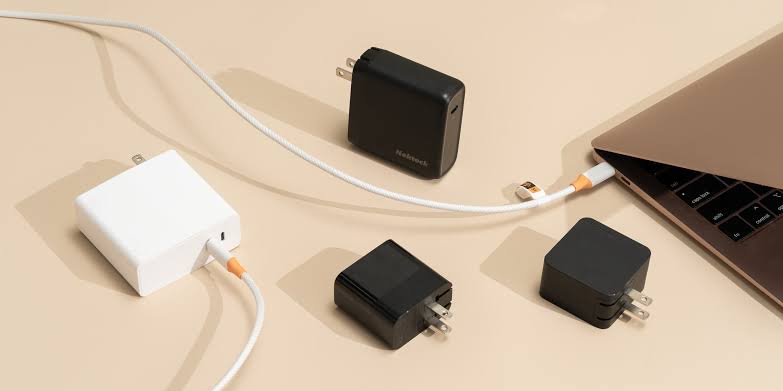
If you lose your laptop charger or simply want to replace it with something smaller and easier to carry, USB-C is probably the first option you will consider.
The problem is that not every USB-C charger works equally well with every laptop.
You will find 45W, 65W, 100W, and even 140W chargers, along with terms such as USB Power Delivery, GaN, and PD 3.1. Then there is the cable itself and the amount of power it can handle.
So, does higher wattage always mean a better charger?
Not necessarily.
Choosing the best USB-C laptop charger should start with the laptop itself. Does it support charging through USB-C? How much power does it need? Once you know that, you can start comparing chargers and cables.
In simple terms:
Laptop Compatibility + Required Wattage + USB Power Delivery + Cable = The Right Charger
What Is the Best USB-C Laptop Charger?
There is no single charger that can be called the best for every laptop.
A 65W charger may be perfect for one device but underpowered for another laptop that requires 100W. At the same time, buying a 140W charger for a laptop that only needs 65W will usually not give you any real charging advantage.
This table gives you a quick starting point:
|
Your Use Case |
What You Should Consider |
|
Lightweight laptop |
45W–65W depending on the device |
|
Laptop originally supplied with 65W charger |
Compatible 65W USB-C PD charger or higher |
|
Laptop with higher power requirements |
100W or more depending on specifications |
|
Laptop that supports 140W |
Compatible 140W charger |
|
Laptop + Phone |
Multi-Port GaN Charger |
|
Laptop + Phone + Tablet |
100W–140W depending on power distribution |
|
Travel and daily commuting |
Compact GaN Charger |
Do not rely on this table alone.
Always check the original charger rating and the official specifications of your exact laptop model.
Before You Buy: Does Your Laptop Support USB-C Charging?
This is the first thing you need to confirm.
Having a USB-C port on your laptop does not automatically mean that the laptop can be charged through it.
Some USB-C ports are used mainly for data transfer, some support external displays, and others support Power Delivery and charging.
In other words:
USB-C Port Does Not Always Mean Charging Port
How Do You Know If Your Laptop Supports USB-C Charging?
The easiest way is to check:
-
The specifications of your laptop model on the manufacturer’s website
-
The user manual
-
The specifications of the USB-C or Thunderbolt ports
-
The original laptop charger
-
Any charging or Power Delivery symbol next to the USB-C port
Do not buy a new charger until you confirm this point. Otherwise, you may end up with an excellent USB-C charger that your laptop cannot use for charging at all.
How Many Watts Should a Laptop Charger Have?
Instead of asking:
“Should I buy 65W or 100W?”
Ask:
How much power does my laptop actually need?
That one question makes the buying decision much easier.
When Is a 45W Charger Enough?
Some lightweight laptops are designed to work with a 45W charger, and in that case there is no need to move to a higher wattage unless you want to use the charger with other devices.
However, if your laptop originally uses a 65W or 100W charger, a 45W charger may be below the recommended power level.
The result may be slower charging or a less convenient experience while using the laptop.
When Is a 65W Charger a Good Choice?
65W is one of the most practical charging categories for laptops that support USB-C charging.
If your laptop originally comes with a 65W charger, then a 65W USB-C PD charger is a logical place to start.
This category is also convenient for work, university, and daily commuting, especially if you choose a compact GaN charger.
When Do You Need a 100W Charger?
A 100W charger becomes more useful when:
-
Your laptop itself requires more power
-
You want to charge your laptop and phone from the same charger
-
You also use a tablet or another USB-C device
-
You want one charger that covers several devices
Just remember:
100W does not mean every laptop will charge faster than it would with a 65W charger.
If your laptop only draws 65W, the additional power will usually be more useful for other devices rather than increasing the charging speed of the laptop itself.
When Do You Need a 140W Charger?
This category is more suitable for laptops that genuinely support or require higher charging power.
If your laptop only needs 65W, using a 140W charger will not make it charge at 140W.
However, if you own a higher-powered laptop or want a strong multi-port charger for several devices, a 140W option can make more sense.
How Do You Know the Right Charger Wattage for Your Laptop?
There are several easy ways to find out.
Check the Original Charger
You will usually find the output specifications printed on the charger.
For example:
20V × 3.25A
The calculation is:
20 × 3.25 = 65W
That means the original charger provides 65W.
Check the Laptop Model Specifications
If you no longer have the original charger, search for the exact model of your laptop.
Do not search only for “Dell” or “HP.”
Two laptops from the same brand can have very different charging requirements.
Check the USB-C Power Requirements
Some manufacturers clearly state the recommended USB-C PD power level for the device.
That information is far more useful than a marketing phrase such as “Fast Laptop Charger.”
What Is USB Power Delivery?
A lot of people confuse USB-C with USB Power Delivery.
The difference is simple:
USB-C refers to the connector.
USB Power Delivery, or USB PD, is the power delivery system that manages charging between the charger and the device.
That is why having USB-C alone is not enough.
If you are looking for a genuine USB-C laptop charger, check:
-
USB PD support
-
Required wattage
-
Charger compatibility
-
Cable compatibility
With USB PD 3.1, much higher power levels are now possible, reaching up to 240W in compatible devices and cables.
That does not mean every USB-C device supports 240W.
65W vs 100W vs 140W: Which One Should You Choose?
Here is a simple comparison:
|
Device Requirement |
65W |
100W |
140W |
|
Laptop needs up to 65W |
Excellent |
Works if compatible |
Usually more than necessary |
|
Laptop needs 100W |
Below recommended level |
Suitable |
Suitable if compatible |
|
Laptop needs 140W |
Below recommended level |
Below recommended level |
Best fit |
|
Laptop + Phone |
Good depending on power distribution |
Better |
Excellent |
|
Multiple devices |
May be limited |
Strong option |
More flexible |
|
Travel |
Excellent |
Excellent with GaN |
Depends on charger size |
The goal is not to start with the biggest number.
Start with:
Laptop Power Requirement → Then Decide Whether You Need Extra Power for Other Devices
Can I Use a 100W Charger Instead of a 65W Charger?
In many cases, yes, as long as the laptop and charger support compatible USB Power Delivery standards.
If your laptop originally uses 65W and you connect it to a USB-C PD charger capable of providing up to 100W, the laptop will not be forced to take 100W.
It will draw the appropriate power within the limits supported by the laptop and charger.
So when does 100W make more sense?
When you want to use the same charger for:
-
Your laptop
-
Your phone
-
Your tablet
-
Another higher-powered device
If you only own one laptop that needs 65W, there is no reason to choose 100W simply because the number is higher.
What Happens If You Use a Charger With Lower Wattage Than Your Laptop Requires?
This is where you need to be more careful.
If your laptop requires 100W and you use a 45W charger, you may experience one or more of the following:
-
Slower charging
-
A “Slow Charger” warning
-
Battery drain while using the laptop even though it is plugged in
-
Better charging performance when the laptop is asleep or turned off
-
The laptop may not recognize the charger as suitable in some cases
If you need a charger for everyday use, it is better to choose a power level that matches or comes close to the manufacturer’s recommendation.
Can Any USB-C Cable Charge a Laptop?
No.
This is one of the most common mistakes people make.
You can buy an excellent 100W charger and pair it with an old cable that does not support that level of power.
In that situation, the cable becomes the weakest part of the charging setup.
The correct formula is:
Laptop + Charger + USB PD + Cable = Actual Charging Performance
When Is a 60W Cable Enough?
If your laptop and charger operate within that power range, a 60W cable may be suitable.
If you want to use 100W or more, you need a cable rated for the required power.
What About 100W and 240W Cables?
If the laptop and charger are capable of delivering higher power, the cable also needs to support it.
Modern USB-C standards include cables capable of carrying up to 240W when used with compatible equipment.
The takeaway is simple:
Do not buy a powerful charger and connect it with just any USB-C cable you have lying around.
Can You Use a 100W Cable With a 65W Charger?
Yes.
As long as the cable is compatible, there is no problem using a 100W-rated cable with a 65W charger.
The cable does not force 100W into the device.
It simply means the cable is designed to handle up to that level of power.
Is a 60W Cable Suitable for a 100W Charger?
Not if you want to use more than 60W.
In that situation, the cable can become the limiting factor.
In other words:
100W Charger + 60W Cable ≠ 100W Charging Setup
If you want to take advantage of 100W charging, every part of the setup needs to support it.
Read also: Best Fast-Charging Cables
Best USB-C Laptop Charger by Use Case
Once you know how much power your laptop needs, the choice becomes much easier.
If Your Laptop Needs 65W
Look for a charger with:
-
USB-C PD support
-
65W output from the required port
-
A suitable cable
-
Practical size
-
A reliable brand
If the charger has multiple ports, check the output of the laptop port when several ports are being used.
If Your Laptop Needs 100W
A 100W charger makes more sense if the laptop genuinely requires this power or if you want to charge more than one device.
For example:
Laptop + Phone
or:
Laptop + Tablet
You still need to check how the charger distributes its power.
If Your Laptop Needs 140W
Do not buy a 140W charger unless you actually have a device that can benefit from it or a multi-device setup that requires higher total power.
Check:
PD Version + Output per Port + Cable + Laptop Requirements
If You Need a Charger for Travel
This is where GaN becomes especially useful.
Why?
Because GaN chargers can offer high power in a smaller form factor than many traditional laptop chargers.
That is useful if you carry your charger in your bag every day or travel frequently.
But GaN does not replace the need for sufficient power.
In other words:
A 45W GaN charger is not better than a 65W charger for a laptop that requires 65W simply because it uses GaN technology.
Joyroom GaN Ultra 65W: A Practical Laptop Charger
If your laptop supports USB-C PD and falls within the 65W category, the Joyroom GaN Ultra 65W is one of the options available on Cart that can serve more than one purpose.
It includes:
-
2× USB-C ports
-
1× USB-A port
-
Up to 65W output in supported configurations
-
PD 3.0
-
PPS
-
GaN technology
-
A 1.2-meter USB-C to USB-C cable rated up to 100W
The main advantage is that it is not just a laptop charger.
It can also be useful if you carry a phone or another device and want to reduce the number of chargers in your bag.
However, if you connect several devices at the same time, pay attention to power distribution because the power available to the laptop may change.
Who is it suitable for? Users with a USB-C PD laptop in the 65W category who want a compact charger for work, university, or travel.
View Joyroom GaN Ultra 65W on Cart
Single-Port or Multi-Port Charger?
If you only need to charge your laptop, a single-port charger may be all you need.
If you carry several devices every day, the situation is different.
Choose a Single-Port Charger If:
-
The laptop is your main device
-
You do not need to charge several devices at once
-
You want a simple, compact charger
-
You want all available power dedicated to one port
Choose a Multi-Port Charger If:
You usually carry:
-
Laptop
-
Phone
-
Tablet
-
Earbuds
-
Smartwatch
In this case, one charger can save you from carrying several separate adapters.
But the most important factor here is power distribution.
What Does Power Distribution Mean?
Suppose you have a charger labeled 100W.
Will your laptop always receive 100W?
Not necessarily.
The charger may provide the full 100W when USB-C1 is used alone, but once you connect a phone to another port, the power may be divided between the two devices.
Every charger distributes power differently.
That is why total wattage alone is not enough.
You also need to know:
How much power does the laptop receive when multiple ports are in use?
This is especially important if you are buying a multi-port charger.
Best USB-C Charger for MacBook
There is no single wattage that works best for every MacBook.
MacBook Air and MacBook Pro have different charging requirements, and power needs also vary between models and generations.
To choose correctly:
-
Identify your MacBook model and year
-
Check the charger wattage recommended by Apple
-
If you want fast charging, review the fast-charging requirements for that exact model
-
Use a compatible charger and cable
Do not buy a 140W charger simply because you have a MacBook, and do not buy 65W just because another MacBook owner uses one.
Best USB-C Charger for HP Laptops
The same rule applies to HP.
Some HP laptops work perfectly with 65W USB-C chargers, while others require more power.
Instead of searching only for:
“Best HP Charger”
Search for:
Your Laptop Model + Wattage + USB-C PD
The laptop model is what really determines the right charger.
Best USB-C Charger for Dell Laptops
Dell laptops also vary significantly in their power requirements.
A lightweight work laptop can need a very different charger from a more powerful laptop or workstation.
If you are replacing the original Dell charger, compare:
Original Wattage + USB-C PD + Cable + Port Output
Do not rely only on the phrase “Compatible with Dell.”
Best USB-C Charger for Lenovo Laptops
Whether you have a ThinkPad, Yoga, or another Lenovo model, there is no one charger that fits every Lenovo laptop.
Check the exact laptop model and original charging requirement.
If the original charger is 65W, that is a good place to start. If the laptop requires more power, do not choose a lower wattage just to save a small amount of money.
Can a MacBook Charger Work With HP, Dell, or Lenovo?
Sometimes, yes.
If:
-
The laptop supports USB-C PD
-
The charger provides enough power
-
The power profile is compatible
-
The cable is suitable
then it may work in many cases.
But USB-C alone is not a guarantee.
Can You Charge a Laptop With a Phone Charger?
A lot of people assume that if both devices use USB-C, the same charger should work.
That is not always true.
If your phone charger provides 25W and your laptop requires 65W, it probably will not give you a normal laptop charging experience.
It may:
-
Charge very slowly
-
Charge only when the laptop is turned off
-
Fail to keep up with power consumption
-
Display a “Slow Charger” warning
-
Be unsuitable as an everyday charging solution
Remember this rule:
Same USB-C Connector ≠ Same Charging Power
Is a GaN Charger Better for a Laptop?
Not always.
GaN is especially useful when you want:
-
Smaller size
-
Lighter weight
-
High power
-
Multiple ports
-
Better portability
However, do not make GaN the first thing you look for.
The right order is:
Compatibility → Wattage → USB PD → Cable → GaN
Can a Higher-Wattage Charger Damage a Laptop?
In compatible USB Power Delivery setups, the laptop does not simply draw the maximum wattage printed on the charger.
If the charger can provide 100W but the laptop needs 65W, the system manages the appropriate power level within the limits supported by both devices.
That does not mean every high-powered charger is automatically suitable.
You should still look for:
-
A reliable brand
-
Suitable USB PD support
-
A compatible cable
-
Proper laptop compatibility
Common Mistakes When Buying a USB-C Laptop Charger
Several mistakes can lead you to buy a charger that does not work the way you expected.
The most common include:
-
Assuming every USB-C port supports laptop charging
-
Buying a charger with lower wattage than the laptop requires
-
Buying a 140W charger for a 45W laptop without any real need
-
Ignoring USB Power Delivery
-
Using a cable that does not support the required power
-
Confusing USB-C with USB PD
-
Buying a multi-port charger without checking power distribution
-
Assuming total charger wattage is always available to the laptop
-
Choosing GaN simply because it sounds newer
-
Trying to use any USB-C phone charger with a laptop
-
Ignoring the manufacturer’s charging recommendation
-
Buying a 100W charger and pairing it with an older low-power cable
How to Choose the Best USB-C Laptop Charger
Before you order, go through this checklist:
-
Make sure the laptop supports USB-C charging
-
Identify the exact laptop model
-
Check the wattage of the original charger
-
Confirm USB Power Delivery support
-
Decide whether you need 65W, 100W, or more
-
Check that the charger port itself provides the required power
-
Use a suitable cable
-
Decide whether you will charge one device or several
-
Check power distribution if the charger is multi-port
-
Choose GaN if compact size matters to you
-
Buy from a reliable brand
-
Do not pay extra for wattage you will never use
If you follow these steps, you are much more likely to choose a charger that actually suits your laptop instead of simply buying the most powerful charger available.
Where to Buy a USB-C Laptop Charger in Jordan
When comparing laptop chargers, do not base your decision only on price or wattage.
Compare:
Laptop Requirement + USB PD + Wattage + Cable + Ports + Power Distribution + GaN
On Cart, you can compare different USB-C charging options and choose according to your laptop and the way you use your devices, whether you need a 65W charger for everyday work or a multi-port GaN charger for your laptop, phone, and tablet.
Not sure which option is right for you? Check the wattage of your original laptop charger first, then compare the available options on Cart based on power and number of ports.
Explore USB-C Chargers on Cart
FAQs About the Best USB-C Laptop Charger
What Is the Best USB-C Laptop Charger?
The best charger is the one that provides the power your laptop needs, supports USB Power Delivery, and works with a suitable cable. For one laptop, 65W may be perfect, while another may require 100W or 140W.
How Do I Know How Many Watts My Laptop Needs?
Check the output printed on the original charger or review the specifications of your laptop model. If the charger says 20V × 3.25A, that equals 65W.
Can Every Laptop With USB-C Be Charged Through USB-C?
No. Some USB-C ports are intended only for data transfer or video. You need to confirm that the laptop supports Power Delivery input through that port.
Is a 65W Charger Enough for a Laptop?
Yes, if the laptop is designed to use 65W or less. If the device requires more power, a 65W charger may not give you the best charging experience.
Can I Use a 100W Charger Instead of a 65W Charger?
In many USB PD-compatible laptops, yes. The device will draw the amount of power it supports within the limits of the charging setup.
Can I Use a 140W Charger With a Laptop That Needs 65W?
Yes, if the charger and laptop are compatible, but the laptop will usually not benefit from the full 140W if it does not need that much power.
What Happens If I Use a Charger With Lower Wattage?
Charging may be slower, you may see a “Slow Charger” warning, or the battery may continue to drain during heavy use even while the laptop is plugged in.
Can a More Powerful Charger Damage My Laptop?
In compatible USB PD setups, the laptop and charger manage the appropriate power level. You should still use a reliable, compatible charger and cable.
Can Any USB-C Cable Charge a Laptop?
No. The cable itself must support the amount of power you want to use.
Can a 100W Cable Work With a 65W Charger?
Yes, as long as all the components are compatible.
What Is USB Power Delivery?
USB Power Delivery is a system for delivering and managing power through USB. It allows compatible chargers and devices to work with different power levels.
What Is the Difference Between USB PD 3.0 and PD 3.1?
USB PD 3.1 expanded the available power range of USB Power Delivery and allows USB-C to support higher wattage levels with compatible devices and cables.
Is GaN Better for Laptop Charging?
It can be more practical because it allows high power in smaller charger designs, but it is not automatically better if the wattage or USB PD support does not match your laptop.
Can I Charge My Laptop With a Phone Charger?
It depends on the charger wattage and the laptop requirements. A 25W phone charger should not be considered a full replacement for a laptop charger that requires 65W simply because both use USB-C.
Can a MacBook Charger Work With Dell, HP, or Lenovo?
It can work with some USB-C PD-compatible laptops, as long as the power output, cable, and other requirements are suitable.
Why Does My Laptop Show “Slow Charger”?
It may happen because the charger does not provide enough power, the cable is limiting the setup, or a multi-port charger is sharing its power between several connected devices.
Is a Multi-Port Charger Suitable for a Laptop?
Yes, especially if you want to charge a laptop, phone, and tablet from one adapter. Just make sure you check the charger’s power distribution before buying.
How Much Does a USB-C Laptop Charger Cost in Jordan?
Prices vary depending on wattage, brand, number of ports, GaN technology, and whether a cable is included. It is better to compare specifications based on your laptop’s needs rather than choosing based on price alone.
Conclusion
Choosing the best USB-C laptop charger in Jordan should not start with the biggest number printed on the charger.
If your laptop needs 65W, a 65W USB-C PD charger may be all you need.
If your laptop requires 100W, do not choose a 45W or 65W charger and expect the same performance.
And if you carry a laptop, phone, and tablet and want to charge them from one adapter, a higher-powered multi-port GaN charger may be more practical and easier to carry.
At the end of the day, follow this order:
Laptop Compatibility → Required Wattage → USB PD → Cable → Ports → Power Distribution
That way, you choose a charger that actually matches your device and your daily use instead of paying extra for power you will never use.
Ready to choose the right charger? Check your laptop’s power requirement first, then compare the USB-C chargers available on Cart and choose the option that actually fits your setup.