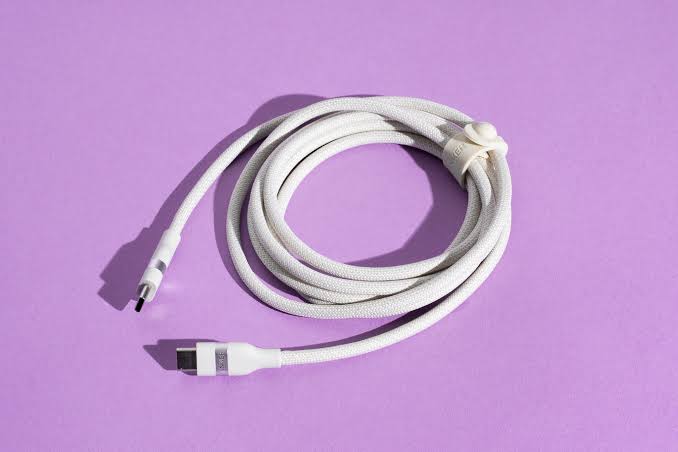
You may already have a fast charger and a phone that supports fast charging, yet your charging setup can still be inconvenient for one very simple reason: the cable is too short.
Maybe the wall outlet is too far from your bed. Perhaps you want to use your phone while sitting on the sofa, or your desk setup makes a standard one-meter cable impractical. In situations like these, buying a 2-meter or 3-meter charging cable seems like the obvious solution.
But once you start searching for the best long charging cables, other questions come up. Does a longer cable charge more slowly? Is a 2m cable better than a 3m cable? Can any long USB-C cable handle a 45W, 65W, or 100W charger?
The answer does not depend on length alone.
A good charging cable should give you the reach you need while still providing the right power capability for your device, compatible connectors, and build quality that can handle everyday use.
A practical way to think about it is:
Length + Connector + Power Rating + Charging Compatibility + Build Quality = The Right Long Charging Cable
In other words, the best long charging cable is not necessarily the longest one. It is the cable that gives you the reach you need without becoming the weakest link in your charging setup.
What Is the Best Length for a Charging Cable?
There is no single cable length that works best for everyone.
If the outlet is right next to your desk, you may not need a long cable at all. But a 2m or 3m cable can be much more convenient when charging next to your bed or sofa.
Here is a simple starting point:
|
Use Case |
Recommended Length |
What to Check |
|
Desk close to an outlet |
1–1.5m |
Power and compatibility |
|
Bedside charging |
2m |
Fast charging and durability |
|
Sofa |
2–3m |
Actual distance from the outlet |
|
Distant wall outlet |
3m |
Cable quality and power rating |
|
Phone or tablet |
Around 2m |
Wattage + Connector |
|
USB-C laptop |
2m or as needed |
Power Rating + USB PD |
|
Travel |
1–2m |
Portability and tangle resistance |
For everyday use, 2 meters is often the most balanced option. It provides much more freedom than a short cable without adding excessive length that becomes difficult to manage.
A 3m cable makes more sense when there is a genuine distance you need to cover.
The rule is simple:
Do not buy the longest cable available. Buy the shortest cable that comfortably solves your reach problem.
Does Cable Length Affect Charging Speed?
Cable length can have an electrical impact because increasing the length of a conductor can increase resistance when other factors remain the same.
However, this does not mean every long cable will automatically charge more slowly than a short one.
In real-world use, charging performance also depends on the cable's design, internal conductors, material quality, power rating, and compatibility with the charger and device.
You may find a 2m cable designed to support 100W or even higher power levels, while a shorter, lower-quality cable becomes the limiting factor in the charging setup.
So instead of asking:
Is this cable long?
A better question is:
Is this cable designed to support the length and charging power I need?
Why Do Some Long Charging Cables Charge Slowly?
If charging becomes slower after replacing your cable, length is not necessarily the only reason.
The cable itself may not support the required power, its internal conductors may not be designed for higher charging loads, or the charger and phone may use a charging protocol that does not work as expected with that cable.
Another common problem is buying a cable labeled “Fast Charging” without checking the actual power specifications.
Do not make the word Fast on the packaging your main buying criterion.
Look at the actual specifications.
Does a 2-Meter Cable Charge as Fast as a 1-Meter Cable?
A well-designed 2m cable that supports the required power can deliver the charging performance your device needs.
For example, the Momax DC28 2M available on Cart supports up to 100W and features an E-Marker chip and braided construction. This is a good example of why a 2-meter cable does not automatically mean low-power charging.
The Baseus CoolPlay offers another example, combining a 2m length with USB-C to USB-C connectivity and charging support up to 100W for compatible devices.
So:
2m ≠ Slow Charging
The specifications of the cable—and the rest of your charging setup—matter much more.
Is a 3-Meter Cable Good for Fast Charging?
It can be, provided you choose a cable designed for that length and the charging power you need.
A 3m charging cable is particularly useful when the wall outlet is far from your bed or sofa, or when you simply need more freedom to move while using your device.
However, there is little reason to choose 3 meters if 2 meters already covers the distance comfortably. The extra length can mean more tangling, more cable on the floor, and a less organized desk setup without giving you any real benefit.
So, 3 meters is not better than 2 meters simply because it is longer.
It is better only when you genuinely need the extra meter.
2m vs 3m Charging Cable: Which Should You Choose?
The decision is easier than it may seem.
When Should You Choose a 2m Charging Cable?
A 2m cable works well for most everyday scenarios, such as using your phone while charging in bed, keeping the charger under your desk, or charging a tablet from a nearby outlet.
It provides plenty of flexibility without making cable management unnecessarily difficult.
For many users, 2 meters is the sweet spot between reach and convenience.
When Should You Choose a 3m Charging Cable?
Choose 3 meters when there is a significant distance between the wall outlet and where you actually use the device.
For example, if the outlet is on one side of the room while your bed or sofa is on the other, a 3m cable may provide the extra reach that a shorter cable cannot.
Measure the distance first rather than buying the longest cable “just in case.”
When Is a 3m Cable Longer Than You Need?
If the outlet is nearby, the extra length can become an inconvenience.
The cable may tangle more easily, leave a large section lying on the floor, or make cable management around your desk more difficult.
Think about the reach you actually need rather than choosing the biggest number available.
What Makes a Good Long Charging Cable?
Choosing the right length is only the first step. Several other specifications are even more important when it comes to actual charging performance.
Charging Wattage
Check the maximum power the cable is designed to support.
You will find cables with ratings such as:
20W – 60W – 100W – 240W
But higher is not automatically better.
If your phone charges at 20W or 25W, buying a cable rated for 100W or 240W will not suddenly make the phone charge faster.
On the other hand, a higher power rating becomes much more useful if you want to use the same cable with a USB-C laptop.
Read also: How Many Watts Does Your Phone Need for Fast Charging?
Connector Type
Check both ends of the cable before buying.
Common options include:
USB-C to USB-C
Suitable for many modern smartphones, tablets, and laptops.
USB-C to Lightning
Suitable for Apple devices that still use a Lightning port.
USB-A to USB-C
Still useful with certain chargers and devices, although the charging speeds and protocols available depend on the specific charger, cable, and device.
Having USB-C on one end does not automatically guarantee maximum charging speed.
Fast-Charging Compatibility
The cable is only one part of the charging system.
To achieve the intended performance, these components need to work together:
Device + Charger + Charging Protocol + Cable
You may have a cable capable of carrying 100W, but the phone, charger, or charging protocol may limit the actual power to a much lower level.
Read also: PD vs PPS vs Quick Charge: What’s the Difference?
Build Quality
Long cables often experience more pulling, bending, and friction than short cables, particularly when used around beds, sofas, and desks.
Look for features such as:
-
Reinforced connectors
-
Strain relief
-
Braided exterior
-
Durable materials around connection points
-
Construction designed for repeated bending and everyday use
However, remember that a braided exterior alone does not tell you how fast the cable can charge.
Data Transfer Speed
One of the most common mistakes is assuming that a cable that is excellent for charging will automatically be excellent for high-speed data transfer.
That is not necessarily true.
Charging Power and Data Transfer Speed are separate specifications.
Some USB-C cables support high charging power while remaining limited to USB 2.0 or 480Mbps data transfer. More advanced options can combine high charging power with data speeds of up to 40Gbps.
For example, the Promate USB4 cable available on Cart combines a 2m length with up to 240W Power Delivery, data transfer speeds of up to 40Gbps, and video output up to 8K@60Hz.
If you plan to use the cable for large file transfers, a monitor, or a dock, do not check wattage alone.
Do You Need a 60W, 100W, or 240W Cable?
The answer depends on the devices you plan to use with it.
When Is a 60W Cable Enough?
A 60W cable can be more than enough for many smartphones, tablets, and compatible USB-C devices with moderate power requirements.
If none of your devices needs more power, there is little benefit in buying a 240W cable simply because the number is higher.
When Is a 100W Cable a Better Choice?
A 100W cable becomes practical when you want one cable that can work across your phone, tablet, and many compatible USB-C laptops.
It can also provide greater flexibility for future devices even if your phone itself does not need anywhere near 100W.
When Do You Need a 240W Cable?
A 240W cable becomes more relevant for compatible high-power devices—not because your phone needs 240W.
USB Power Delivery can support much higher power levels with compatible equipment, but using a 240W cable does not mean your phone will suddenly start drawing 240W.
So:
Higher Cable Rating ≠ Higher Phone Charging Speed
Read also: Best USB-C Laptop Charger
Does a 100W Cable Make Your Phone Charge at 100W?
No.
The 100W rating means the cable is designed to support power up to that level within a compatible charging setup. It does not determine how much power the phone will actually receive.
If your phone supports 25W and you use:
100W Cable + Compatible Charger
your phone does not become a 100W charging device.
Actual charging power still depends on:
Phone + Charger + Protocol + Cable
Do not pay for a higher cable rating because you expect it to make every device charge faster.
Choose a higher rating when you genuinely need it or when you want one cable that can work with a wider range of devices.
Best Long Charging Cable for iPhone
The first step is to identify which port your iPhone uses.
Newer iPhone models with USB-C require an appropriate USB-C cable, while older iPhone models with Lightning need a USB-C to Lightning cable if you want to use them with a compatible USB-C charger.
Cable length does not change this basic rule.
If you regularly use your phone in bed or at your desk, 2 meters will often provide comfortable reach.
If you have an older Lightning-equipped iPhone and the outlet is particularly far away, 3m options are also available.
Read also: Best iPhone Charger in Jordan
Best Long Charging Cable for Samsung Phones
For most modern Galaxy phones, USB-C to USB-C is the most logical starting point.
But do not choose just any USB-C cable.
Check:
Galaxy Model → Charging Wattage → Charger/Protocol → Cable
If your Galaxy phone supports higher charging power, the cable must be able to handle the required power and current for the charging mode you want to use.
This is especially important with some of Samsung's higher Super Fast Charging modes.
Read also: Best Samsung Charger in Jordan
Best Long Charging Cable for Android Phones
“Android cable” is far too broad to be a useful buying criterion.
Phones from Xiaomi, HONOR, Google, and other manufacturers can use different charging wattages and protocols.
Start with the exact phone model, then identify:
Connector + Wattage + Charging Technology + Length
That is much more useful than buying a cable simply because it says “Android” or “Fast Charging.”
Best Long Charging Cable for a Tablet
Tablets can benefit significantly from longer charging cables, especially when you use them for streaming, studying, or working at a desk while they are plugged in.
A 2m cable is often very practical here.
However, check the tablet's charging requirements, particularly if it uses USB-C Power Delivery.
Best Long USB-C Cable for a Laptop
With laptops, the cable's power rating becomes even more important.
A cable that works perfectly well for a phone may not be the right choice for a laptop that requires 65W, 100W, or more.
If your laptop requires 100W, for example, having a 100W charger is not enough. The cable also needs to support the required power.
This is why long USB-C cables rated for 100W or 240W can make more sense if you want one cable for both your laptop and phone.
Best Long Charging Cables on Cart
Instead of ranking products from “best” to “worst,” it makes more sense to choose a cable according to your device, required reach, and use case.
Momax DC28 100W 2M: A Balanced Choice for Everyday Use
If you want a 2-meter USB-C to USB-C cable that can work across different types of devices, the Momax DC28 supports charging up to 100W and features a nylon-braided design and E-Marker chip.
It is designed for compatible smartphones, tablets, and laptops.
The advantage here is not simply the 100W number. It is the combination of 2m length + high power capability + construction designed for repeated everyday use.
View Momax DC28 100W 2M on Cart
Baseus CoolPlay 100W 2M: A Long USB-C Cable for Phones and Laptops
The Baseus CoolPlay is another 2-meter option with USB-C to USB-C connectivity and charging support up to 100W.
This type of cable makes sense if you would rather not keep one cable for your phone and another for your laptop, provided the rest of your charging setup is compatible with both devices.
View Baseus CoolPlay 100W 2M on Cart
Baseus Superior 2M: A Practical Option for Lightning iPhones
If you have an iPhone that still uses Lightning, the Baseus Superior provides USB-C to Lightning connectivity at a 2-meter length, with PD charging support up to 20W according to the product specifications.
It gives you the additional reach while remaining suitable for compatible USB-C charging setups.
View Baseus Superior 2M USB-C to Lightning on Cart
Anker 322 3M: When You Actually Need the Extra Reach
If 2 meters is not enough, the Anker 322 USB-C to Lightning cable available on Cart comes in a 3-meter length with MFi certification and a double-braided design.
This option makes more sense when distance is genuinely the problem—for example, when the outlet is far from your bed or usual seating position.
View Anker 322 USB-C to Lightning 3M on Cart
Promate PowerBolt240 2M: For More Than Just Phone Charging
If you need a long cable for a laptop, monitor, or dock rather than just a phone, you enter a very different category of USB-C cables.
The Promate PowerBolt240 is 2 meters long and supports up to 240W Power Delivery, data transfer speeds up to 40Gbps, and video output up to 8K@60Hz according to the product specifications.
Those capabilities would be excessive for someone who simply wants to charge a 20W or 25W phone, but they become useful when you need Power + High-Speed Data + Video from a single cable.
View Promate PowerBolt240 2M on Cart
Comparing Long Charging Cables on Cart
|
Cable |
Length |
Type |
Listed Power Rating |
Best For |
|
Momax DC28 |
2m |
USB-C to USB-C |
100W |
Phone + tablet + laptop |
|
Baseus CoolPlay |
2m |
USB-C to USB-C |
100W |
Everyday use and USB-C devices |
|
Baseus Superior |
2m |
USB-C to Lightning |
20W |
Lightning-equipped iPhones |
|
Anker 322 |
3m |
USB-C to Lightning |
Up to 60W according to Cart |
Extra reach and compatible Apple devices |
|
Promate PowerBolt240 |
2m |
USB-C |
240W |
Laptop + data + displays |
These figures describe the cable's listed capabilities, not necessarily the power that the connected device will receive. Actual charging power depends on the device, charger, charging protocol, and cable working together.
Best Long Charging Cable by Where You Use It
Sometimes it is easier to choose the right cable based on where you plan to use it rather than starting with technical specifications.
For Charging Next to Your Bed
A 2m cable is often an excellent starting point.
Measure the distance between the outlet and where you normally keep your phone, then leave a little extra room for movement rather than automatically choosing 3 meters.
For Charging on the Sofa
You may need 2m or 3m depending on where the outlet is located.
If the outlet is behind the sofa or on the opposite wall, 3 meters may be much more comfortable.
For Your Desk
Do not think about distance alone.
Consider where the cable will run and how you plan to organize it. On many desks, 2 meters provides enough flexibility without leaving a large amount of excess cable coiled on the surface.
For the Car
Longer is not always better.
Excess cable can create unnecessary clutter around the center console, phone mount, or charging area. Choose enough length to connect the charger to your device comfortably without leaving a large amount of loose cable.
For Travel
A longer cable can be very useful when you do not know where the power outlets will be in a hotel room.
However, a 3m cable can take up unnecessary space in your bag if you rarely need that much reach.
For many travelers, 1.5–2 meters provides a better balance.
Are Long Charging Cables Safe?
A cable does not become unsafe simply because it is long.
What matters is whether the cable is designed for the power being used, remains in good condition, has secure connectors, and is paired with a compatible charger and device.
Watch for warning signs such as:
-
Unusual heat around the cable or connector
-
Cuts or cracks in the outer jacket
-
Loose USB connectors
-
Charging repeatedly disconnecting when the cable moves
-
Severe bending or damage near the connector
If you notice these signs, do not continue using the cable simply because “it still charges.”
Is a Braided Charging Cable Better?
A braided design can be useful for long cables because it may improve durability against everyday friction and repeated handling. Some designs may also be easier to manage.
However, do not use braiding as an indicator of charging speed.
Braided Cable ≠ Faster Cable
A braided cable may have a relatively low power rating, while a non-braided cable may support considerably more power.
Treat durability and charging capability as separate specifications.
Can You Use a Long Cable With a 45W or 65W Charger?
Yes, provided the cable can handle the required power and the rest of the charging setup is compatible.
For example:
65W Charger + Cable Limited Below Required Power → Cable Can Become the Limiting Factor
Whereas:
65W Charger + Compatible 100W Cable → Cable Has Sufficient Power Headroom
Even in the second example, however, the phone or laptop still determines how much power it can use within the compatible charging system.
You cannot evaluate charging performance based on the charger or cable alone.
How to Choose a Long Charging Cable Without Losing Performance
Before buying a cable, go through these steps:
-
Measure how much reach you actually need.
-
Decide whether 2m is enough or you genuinely need 3m.
-
Check the connector on your device.
-
Find out how much charging power your device supports.
-
Check the cable's power rating.
-
Make sure the charger is compatible with your device.
-
Review any specific cable requirements for the charging mode you want to use.
-
If you transfer files, check data transfer speed separately.
-
Choose a design that can withstand everyday use.
-
Do not pay for 240W if your setup cannot benefit from it.
-
Do not rely on the words “Fast Charging” alone.
-
If you plan to use the same cable with a phone and laptop, choose the specifications based on the device with the higher power requirements.
This approach helps you choose based on how you actually use your devices rather than relying only on cable length or the biggest wattage number.
Common Mistakes When Buying a Long Charging Cable
One of the most common mistakes is assuming that the longest cable must be the best one. In reality, extra length provides little value when you do not need it.
You should also avoid assuming that all USB-C cables are the same. The connector shape alone does not tell you the cable's charging power, data transfer speed, or video capabilities.
Another mistake is buying a 100W cable because you expect it to make a 25W phone charge faster. Similarly, a braided exterior should not distract you from the cable's actual electrical specifications.
And if you need high-speed file transfers, do not assume that a cable designed primarily for charging will automatically provide the data speeds you need.
Most importantly, never evaluate the cable in isolation.
Even the best cable cannot make a low-power charger or a phone with limited charging capability charge beyond its supported limits.
Is a Long Charging Cable Better Than Using an Extension Cord?
It depends on the problem you are trying to solve.
If you simply want your phone to reach you while you are sitting in bed or on the sofa, a longer charging cable is often the simplest solution.
If you are trying to cover a much greater distance for a laptop charger or a complete desk setup, however, repositioning the adapter or power source may sometimes be more practical than relying on an extremely long USB cable.
The goal is not to choose the same solution every time. It is to build a charging setup that is convenient, organized, and suitable for everyday use.
Where to Buy Long Charging Cables in Jordan
When choosing a cable, do not use length as your only filter.
Compare:
Length + Connector + Wattage + Device Compatibility + Data Needs + Build Quality
On Cart, you can find 2m and 3m options alongside USB-C and Lightning cables with different power ratings for smartphones, tablets, and laptops.
Start by deciding how much reach you actually need, then choose the cable specifications that match your devices.
Explore Cables and Chargers on Cart
FAQs About Long Charging Cables
Does a Long Charging Cable Reduce Charging Speed?
Not necessarily. Cable length is one factor in cable design, but actual charging performance also depends on conductor quality, power rating, the charger, the device, and charging requirements. A well-designed long cable can support fast charging for compatible devices.
Does a 2-Meter Cable Charge Fast?
Yes. There are 2m cables designed to support high charging power. Check the cable's power rating and compatibility rather than judging its charging performance based on length alone.
Is a 3-Meter Cable Suitable for Fast Charging?
It can be, provided the cable is designed for the required power and is compatible with your charger and device. Choose 3 meters when you genuinely need the extra reach.
Which Is Better: a 2m or 3m Charging Cable?
A 2m cable is more practical for many everyday situations, while a 3m cable is better when the outlet is farther away. There is no universally better length; it depends on the actual distance you need to cover.
What Is the Best Length for a Charging Cable?
For bedside, desk, and general home use, 2 meters often provides a good balance between freedom of movement and easy cable management. Some setups, however, genuinely require 3 meters.
Can a Long Cable Damage Your Phone Battery?
Cable length itself does not determine battery health. What matters more is using a reliable, compatible charger and cable and replacing the cable if it shows signs of damage or unusual heat.
Is a 3-Meter Charging Cable Safe?
It can be safe when it is a well-made product designed for its stated length and power capability. Length alone does not determine whether a cable is safe or unsafe.
Can a Long USB-C Cable Support Fast Charging?
Yes. Long USB-C cables are available with power ratings such as 60W, 100W, and 240W. However, the charger and connected device must also support the required charging setup.
Is a 60W Cable Suitable for a Phone?
For many smartphones, 60W is already higher than the device's maximum charging requirement. It can still be used with compatible devices, but a phone will not charge at 60W if it does not support that power level.
Is a 100W Cable Better Than a 60W Cable?
Not always. A 100W cable provides greater flexibility for higher-power devices, particularly some laptops, but it will not make a phone limited to 20W or 25W charge faster simply because the cable supports 100W.
Can You Use a 100W Cable With a 25W Charger?
Yes, within a compatible charging setup. The 100W rating describes the maximum power level the cable is designed to support; it does not force the charger or device to use 100W.
Can You Use a Long Cable With a 65W Charger?
Yes, provided the cable supports the required power and the rest of the charging system is compatible.
Does the Cable Affect Charging Wattage?
It can. A cable may become the limiting factor if it is not designed for the power the charger and device are attempting to use. Checking the cable's power rating is particularly important when charging laptops or using higher-power charging modes.
Is a Braided Cable Better?
A braided cable can offer practical durability benefits, but braiding does not automatically mean faster charging. Check charging capability and compatibility separately from build quality.
Do All USB-C Cables Transfer Data at the Same Speed?
No. USB-C describes the connector, not one universal data speed. Some cables focus primarily on charging and provide basic data speeds, while USB4 and Thunderbolt cables can support much faster data transfer.
How Do I Know the Power Rating of a USB-C Cable?
Check the manufacturer's specifications or product page for information such as Power Delivery or maximum power ratings like 60W, 100W, or 240W. Do not assume the power capability based on the USB-C connector alone.
What Is the Best Long Charging Cable for iPhone?
It depends on the iPhone's port. Lightning-equipped models need a compatible cable such as USB-C to Lightning, while USB-C iPhones use USB-C cables. After that, choose the length and power capability based on your charger and how you use the phone.
What Is the Best Long Charging Cable for Samsung?
Start with your exact Galaxy model and its supported charging power. Then choose a USB-C to USB-C cable that meets the power and charging requirements. Some higher Samsung charging modes have specific cable requirements, so length should not be your only consideration.
Conclusion: Choose the Reach You Need, Not the Longest Cable You Can Find
Searching for the best long charging cables should not end with buying a 3m cable simply because it is longer—or a 240W cable simply because it has the biggest number.
Start with the real problem:
How much cable length do you actually need to comfortably reach the place where you use your device?
Once you know the required length, check your device, connector type, charging power, compatibility, and cable quality.
The decision can be summarized as:
Length → Device → Connector → Power Rating → Charging Compatibility → Build Quality
If 2 meters comfortably reaches your bed or desk, it will often be the more practical option. If you genuinely need 3 meters, choose a cable with clear specifications that is designed for the power requirements of your device.
The goal is not to own the longest charging cable. It is to have a cable that gives you more freedom to use your device without sacrificing the charging performance your device is designed to support.