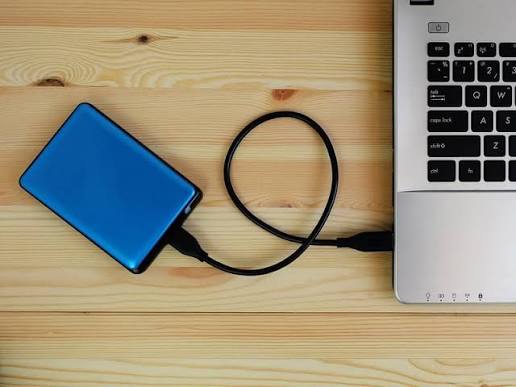
Running out of laptop battery in the middle of a workday, university lecture, or trip can quickly become a problem, especially when there is no power outlet nearby. This raises an increasingly common question: Can you charge a laptop with a power bank just like you charge your phone?
The short answer is yes. Many modern laptops can be charged with a power bank, but not every power bank is powerful enough to do the job. Likewise, simply having a USB-C port on your laptop does not automatically mean that the port supports charging.
For the setup to work correctly, your laptop must support charging through USB-C or another connection supported by the power bank. The power bank must also provide sufficient output for the laptop, usually with USB Power Delivery (USB PD) support, and you need a cable capable of carrying the required power.
This is why choosing a laptop power bank requires more than looking at numbers such as 10,000mAh or 20,000mAh. Capacity tells you how much energy the power bank can store, while wattage tells you how much power it can deliver to your device.
If you want to understand capacity first, read Cart's guide to choosing the right power bank capacity, then use this guide to determine what your laptop actually needs.
How Can a Power Bank Charge a Laptop?
Phones, earbuds, and other small electronics generally require less power than laptops. As a result, a power bank designed primarily for phones may not be suitable for a laptop, even when it has a large battery capacity.
For many modern laptops, the solution is USB Power Delivery.
USB PD is a charging standard that allows compatible devices and power sources to negotiate supported power levels. With USB PD 3.1, compatible equipment can support power delivery of up to 240W, significantly expanding the range of devices that can receive power through USB-C.
However, this does not mean that you need a 240W power bank to charge every laptop. Different laptops have different requirements, so the goal is to match the power bank to the device rather than simply buying the highest wattage available.
Can Every USB-C Port Charge a Laptop?
No, and this is one of the most important things to understand before buying a laptop power bank.
The shape of the connector does not tell you everything the port can do. A USB-C port may support data transfer, video output, charging, Power Delivery, or a combination of these functions.
So, if your laptop has a USB-C port, do not automatically assume that connecting a power bank to it will charge the battery.
The safest approach is to check the specifications for your exact laptop model on the manufacturer's website or in its user manual. Look specifically for USB-C charging or USB Power Delivery support and check the recommended power requirements.
The same principle applies when choosing your main laptop charger. Cart's guide to choosing the right USB-C laptop charger explains the relationship between USB-C, wattage, Power Delivery, and charging cables in more detail.
What Do You Need to Charge a Laptop With a Power Bank?
For reliable charging, four elements need to work together. Ignoring even one of them can result in slower charging or prevent charging altogether.
1. Your Laptop Must Support Charging Through USB-C
Start with the laptop, not the power bank.
Check your laptop model and the specifications of its USB-C ports. If the laptop relies exclusively on a proprietary charging connector and cannot accept power through USB-C, buying a USB-C PD power bank alone will not solve the problem.
If the laptop supports USB-C charging or USB Power Delivery, you can then determine how much power it requires.
2. The Power Bank Must Provide Enough Output
A "Fast Charging" label alone is not enough.
There is a significant difference between a power bank that outputs 20W and one capable of delivering 65W, 100W, or 140W through USB-C. A 20W model may be excellent for a smartphone without being suitable for your laptop.
Always check the maximum output of the specific port you intend to use, rather than looking only at the total wattage advertised for the entire power bank.
3. USB Power Delivery Support Matters
For many laptops that charge through USB-C, USB PD is one of the key specifications to look for.
Power Delivery enables compatible devices to work with supported power levels instead of relying on basic, low-power USB charging.
When shopping for a laptop power bank, therefore, don't stop at seeing "USB-C" in the specifications. Check whether the relevant port supports USB PD and how much power that port can actually deliver.
4. The Cable Is Part of the Charging System
You can have a powerful power bank and a laptop that supports fast charging and still get disappointing results because of the cable.
Your USB-C cable must be capable of carrying the required power. This becomes increasingly important as charging wattage rises.
In other words, the correct equation is not:
Powerful power bank = fast charging
It is:
Compatible laptop + USB PD + sufficient wattage + suitable cable = proper laptop charging
How Many Watts Does a Laptop Need From a Power Bank?
There is no single wattage that works for every laptop.
Some lightweight laptops can operate with relatively modest power levels, while others may require 65W, 100W, or more. The amount of power required for basic charging may also differ from the wattage needed to achieve the laptop's fastest supported charging speed.
The following table can be used as a general starting point:
|
Laptop Charging Requirement |
What to Look for in a Power Bank |
|
Around 30–45W |
USB-C PD output that meets or exceeds the device requirement |
|
Around 60–65W |
USB-C PD port capable of at least 65W |
|
Around 90–100W |
USB-C port capable of approximately 100W |
|
More than 100W |
Power bank and cable supporting the required wattage; USB PD 3.1 may be necessary |
These figures are guidelines, not universal compatibility rules. Your laptop manufacturer's specifications should always be your primary reference.
Can You Use a Power Bank With Lower Wattage Than Your Laptop Charger?
Sometimes, but the experience may not be what you expect.
Suppose your laptop normally uses a 65W power source, while your power bank can provide less than that. Depending on the laptop and how it manages power, it may charge more slowly, display a low-power or slow-charger warning, or fail to increase its battery level effectively during demanding use.
There is also a major difference between charging a laptop while it is turned off or performing light tasks and trying to charge it while running power-intensive software.
If the laptop is consuming energy at a rate close to or higher than what the power bank can provide, the battery percentage may increase very slowly, remain unchanged, or even continue falling while the power bank is connected.
The goal should therefore not be to find a power bank that can charge your laptop "somehow." Look for one that matches the laptop's requirements closely enough for your intended use.
Can a 20W or 30W Power Bank Charge a Laptop?
It may work with certain low-power devices, but 20W or 30W should not be treated as universally suitable for laptops.
A 20W power bank may be excellent for charging a smartphone, but a 20,000mAh capacity does not suddenly make that same power bank appropriate for a laptop.
This is where the distinction between capacity and power matters:
mAh = how much energy the power bank can store.
W = how quickly it can deliver power to a device.
You can therefore have a high-capacity power bank with relatively low output and another model with a similar capacity capable of delivering 65W, 100W, or 140W.
Looking for the right option for your devices? Browse the power bank collection at Cart and compare capacity, maximum USB-C output, and Power Delivery support before buying.
Can a 65W Power Bank Charge a Laptop?
A 65W power bank can be suitable for many USB-C PD laptops that require similar power levels, but 65W is not a universal number that works with every laptop.
If your laptop is designed to operate with a 65W USB-C charger, a power bank capable of actually delivering 65W from the appropriate USB-C port can be a sensible choice, provided the charging protocol and cable are also compatible.
If your laptop requires significantly more power, however, you may not get the same charging performance as you would from its original adapter.
One option available through Cart is the Belkin 3-Port Laptop Power Bank 20K 65W, which represents the type of higher-output power bank designed for devices including compatible USB-C laptops. You can find it within Cart's power bank collection.
Is a 100W Power Bank Good for a Laptop?
If your laptop accepts USB-C PD charging and requires 100W or less, a power bank capable of delivering 100W from a single USB-C port may be suitable.
The phrase "from a single port" is important.
You may see a power bank advertised as 165W, 200W, or 220W, but that number can refer to the combined output distributed across multiple ports, rather than the output available from one USB-C connection.
For example, the Anker 165W Power Bank 25,000mAh offers up to 165W total output, while its USB-C ports can provide up to 100W per port according to the product specifications on Cart.
This is a good example of why you should always examine power distribution rather than relying on the largest wattage printed in a product name.
Are There Power Banks That Can Charge Laptops at More Than 100W?
Yes. Developments in USB Power Delivery have made higher charging levels possible for compatible devices, power sources, and cables.
One higher-output option available through Cart is the Anker Prime Power Bank 20K 220W. It has a 20,100mAh capacity, up to 220W combined output, and supports USB-C output of up to 140W according to its listed specifications.
This category can be particularly useful if you have a laptop with higher power requirements or want to charge a laptop alongside a phone, tablet, or another device.
But remember: higher wattage is not automatically better for your particular laptop.
If your laptop can only make use of 65W, connecting it to a 140W-capable power source does not force the laptop to consume 140W, nor does it automatically double its charging speed.
Can You Charge a MacBook With a Power Bank?
Yes. Many modern MacBook models can receive power from a suitable USB-C source, which means a compatible power bank can be useful when working or travelling away from an outlet.
However, "MacBook" covers a wide range of MacBook Air and MacBook Pro models with different batteries, charging capabilities, and power requirements.
It would therefore be inaccurate to say that every 65W or 100W power bank will provide the same charging experience with every MacBook.
Check the specifications for your exact MacBook model first, then compare its charging requirements with the maximum USB-C output of the power bank and the rating of the cable you plan to use.
For higher-power applications, the Anker Prime 20K 220W Power Bank supports up to 140W USB-C output according to its Cart specifications, making it one option worth comparing for compatible USB-C laptops with higher power requirements.
Can You Charge a Windows Laptop With a Power Bank?
Yes, provided that the specific laptop model supports it.
Windows itself does not determine whether a laptop can be charged from a power bank. The deciding factors are the laptop's hardware, ports, and charging specifications.
For example, one Dell, HP, Lenovo, or ASUS laptop may support USB-C Power Delivery, while another model from the same manufacturer may use a different charging connector or have a USB-C port with different capabilities.
Instead of looking for a "power bank for Windows," look for a power bank compatible with your exact laptop model and its charging wattage.
Can a 10,000mAh or 20,000mAh Power Bank Charge a Laptop?
Potentially, but mAh alone cannot answer the question.
Imagine one 20,000mAh power bank that provides only 20W and another with a similar capacity that can deliver 100W through USB-C PD. Both store energy, but the second could be significantly better suited to a laptop with higher power requirements.
Capacity still matters because it affects how much energy you can carry with you. However, you should first establish that the power bank is compatible with your laptop and capable of supplying sufficient power.
If you are deciding between different capacities, Cart's guide to choosing the right power bank capacity explains when a larger capacity makes sense and when output and charging technology should be a greater priority.
How Many Times Can a Power Bank Charge a Laptop?
You cannot calculate the number of laptop charges accurately from the power bank's mAh rating alone.
For a more realistic estimate, you need to consider energy in Wh (watt-hours) and compare the usable energy stored in the power bank with the laptop battery's energy capacity. You also need to account for energy lost during voltage conversion and charging.
If you use the laptop while it is connected, some of the power bank's energy is also being used to run the laptop rather than being stored in its battery.
The actual number of charges therefore depends on:
-
The usable energy stored in the power bank.
-
The laptop battery capacity in Wh.
-
Conversion efficiency.
-
Laptop power consumption during charging.
-
The laptop's battery level when charging begins.
-
Power distribution when multiple devices are connected.
This is why claims such as "a 20,000mAh power bank will charge any laptop twice" should be treated cautiously. Real-world results can vary considerably between devices.
Can You Use a Laptop While Charging It With a Power Bank?
Yes, with many compatible devices you can continue using the laptop while it is connected to the power bank. However, what you are doing on the laptop makes a substantial difference.
Writing a document or browsing the web does not consume the same amount of power as gaming, exporting a large video project, or performing intensive 3D rendering.
As laptop power consumption rises, sufficient power bank output becomes increasingly important. If the power bank supplies less power than the laptop is consuming, you may not see the battery percentage increase as expected.
For people who regularly work from a laptop while travelling, sustained output capability can therefore be more important than simply choosing the largest possible capacity.
What Happens When You Charge Multiple Devices From One Power Bank?
This is another specification that is easy to overlook.
Suppose a power bank advertises 200W total output. That does not necessarily mean every port can supply 200W. It also does not guarantee that your laptop will continue receiving its maximum charging power once a phone and tablet are connected at the same time.
Each power bank has its own power-distribution system.
For example, the Anker Prime Power Bank 200W includes two USB-C ports and one USB-A port. According to the product specifications listed by Cart, it supports up to 200W combined output and can provide 100W to each of two compatible laptops in a supported charging configuration.
If you plan to charge several devices simultaneously, always check the product's power distribution specifications rather than looking at total wattage alone.
Is It Safe to Charge a Laptop With a Power Bank?
Charging a laptop with a power bank can be safe when you use a reliable product that is compatible with the laptop's charging requirements and pair it with the correct cable.
Avoid products with vague specifications that advertise phrases such as "Super Fast Charging" without clearly stating output wattage or supported charging protocols.
When comparing options, also look for clearly stated protection systems designed to address issues such as overheating, overcurrent, and short circuits.
The simplest rule is this: do not try to power a laptop with a charging source whose specifications you cannot verify.
Common Mistakes When Charging a Laptop With a Power Bank
One of the most common mistakes is buying based on capacity alone. A 20,000mAh or 30,000mAh rating does not tell you whether the power bank can deliver enough wattage for your laptop.
Another mistake is assuming that every USB-C port supports laptop charging. USB-C describes the connector; the capabilities of individual ports can differ considerably.
The cable is also frequently overlooked. A powerful power bank paired with an unsuitable cable can prevent you from reaching the expected charging performance.
You should also avoid confusing total output with single-port output. If a power bank is advertised as 220W, check how much power the specific USB-C port connected to your laptop can actually provide.
Finally, don't assume that buying the highest wattage available is always the best choice. The goal is compatibility, not simply the largest number on the box.
How to Choose the Best Power Bank for a Laptop
Start by asking, "What does my laptop need?" rather than, "What is the most powerful power bank I can buy?"
Before choosing a power bank, check:
-
Whether your laptop supports charging through USB-C.
-
The charging wattage required by your laptop.
-
Whether the power bank supports USB Power Delivery.
-
The maximum output available from a single USB-C port.
-
Whether your cable supports the required wattage.
-
The power bank's capacity in Wh and mAh.
-
How many devices you want to charge simultaneously.
-
How power is distributed when several ports are in use.
-
Whether the size and weight suit everyday use or travel.
-
Whether the product has clearly stated safety features and reliable specifications.
Not sure which model fits your setup? Compare the options in Cart's guide to laptop power banks in Jordan to understand the differences in capacity, output, and port configuration before choosing.
Laptop Power Bank Options From Cart
Instead of comparing power banks based only on capacity, consider how much power each model can actually deliver:
|
Product |
Capacity |
Listed Power |
Best Suited For |
|
Belkin 3-Port Laptop Power Bank |
20,000mAh |
65W |
Compatible USB-C laptops with moderate power requirements |
|
Anker 165W Power Bank |
25,000mAh |
165W total; up to 100W via USB-C |
Work, travel, and charging a laptop alongside other devices |
|
Anker Prime Power Bank 200W |
20,000mAh |
200W total |
Charging multiple high-power devices |
|
Anker Prime 20K 220W |
20,100mAh |
220W total; up to 140W via USB-C |
Compatible higher-power laptops and demanding use |
Your laptop specifications remain the deciding factor, so this table should not be treated as a universal compatibility list.
Take your power with you wherever you go. Browse power banks at Cart and compare USB-C PD output, capacity, and port configurations to find an option that suits your laptop and everyday devices.
Can You Take a Laptop Power Bank on a Plane?
A power bank can be extremely useful when travelling with a laptop, but airline and aviation rules are another reason to pay attention to specifications.
Restrictions on lithium batteries are generally based on energy capacity in Wh, and there can be rules governing where power banks must be carried and whether higher-capacity batteries require additional approval.
For that reason, don't rely only on the mAh number when travelling. Check the Wh rating printed on the power bank and review the latest rules of your airline before travelling.
For more advice on choosing a portable option, read Cart's guide to power banks for travel in Jordan.
FAQs About Charging a Laptop With a Power Bank
Can You Charge a Laptop With Any Power Bank?
No. The laptop must be able to receive power through the connection provided by the power bank, while the power bank must support suitable charging protocols and sufficient output. For many modern USB-C laptops, USB Power Delivery is an important part of that compatibility.
Can a 65W Power Bank Charge a Laptop?
It can charge compatible laptops that require around 65W or less, but it should not be assumed to work optimally with every laptop. Check the charging requirements of your exact model first.
Is a 100W Power Bank Enough for a Laptop?
It can be sufficient for many USB-C PD laptops requiring up to 100W, provided that the relevant port can actually deliver 100W and the cable is compatible.
Can a 20,000mAh Power Bank Charge a Laptop?
Possibly. However, 20,000mAh describes capacity rather than charging power. You also need to check wattage, USB-C output, and Power Delivery support.
Can You Charge a MacBook With a Power Bank?
Many modern MacBook models can be charged from a suitable USB-C power source. However, power requirements vary by model, so the MacBook's specifications should be matched with the power bank output and cable.
Does Having USB-C Mean My Laptop Supports Charging?
No. A USB-C connector alone does not guarantee that the laptop can receive charging power through that port. Check the official specifications or user manual for your exact model.
Why Won't My Power Bank Charge My Laptop Even Though It Has USB-C?
Possible reasons include a USB-C port that does not support charging, insufficient power bank output, an incompatible charging protocol, or a cable that cannot carry the required power.
Can I Use My Laptop While Charging It From a Power Bank?
Yes, with compatible devices. However, laptop power consumption affects how quickly the battery charges. During demanding workloads, the battery may charge slowly, remain at the same level, or continue to decrease if the power source cannot keep up.
Is Every Fast-Charging Power Bank Suitable for a Laptop?
No. "Fast Charging" is not enough information by itself. Check the supported protocol, USB-C output wattage, and your laptop's requirements.
Does Higher Wattage Always Charge a Laptop Faster?
No. A laptop draws power according to what its charging system supports. Using a power source capable of delivering more wattage than the laptop can accept does not automatically increase charging speed.
Conclusion: Can You Charge a Laptop With a Power Bank?
So, can you charge a laptop with a power bank? Yes. For university, work, travel, and other situations where a wall outlet is not available, the right power bank can be an extremely practical backup power source.
The key is choosing based on compatibility rather than capacity alone. First confirm that your laptop supports USB-C charging, identify its power requirements, then choose a power bank with suitable USB Power Delivery output and pair it with a cable capable of carrying the required wattage.
Most importantly, don't let a number such as 20,000mAh or 200W make the decision for you. The compatibility between your laptop, power bank, charging protocol, and cable is what determines the actual charging experience.
Need portable power for your laptop and everyday devices? Explore power banks at Cart and compare USB-C PD output, capacity, and charging options to find the right match for your setup.