Owning a smartphone with a powerful camera does not automatically mean every photo or video you capture will look professional. Sometimes, the problem has much less to do with the camera specifications and much more to do with how you shoot. Your hand may move while recording, the lighting may be poor, your shooting angle may be limited, or background noise may affect the quality of your video.
This is where mobile photography accessories can make a real difference.
The goal, however, is not to fill a bag with equipment you rarely use. A good accessory should solve a specific problem in the way you shoot. You may only need a tripod to achieve a stable frame, while someone who regularly records while walking may benefit more from a gimbal. For product photography, investing in proper lighting and an overhead mount may be more valuable than either.
So, if you are looking for the best mobile photography accessories, this guide will help you understand what each accessory does, when it is worth buying, and how to choose the right equipment for your photography and videography needs.
What Are the Most Important Mobile Photography Accessories?
Not everyone needs the same equipment, but several accessories cover most smartphone photography and videography needs.
|
Accessory |
Main Purpose |
Best For |
|
Tripod |
Keeping the phone stable |
Photos and stationary video |
|
Gimbal |
Stabilizing movement |
Vlogs and walking shots |
|
LED Light |
Controlling lighting |
Faces, products, and video |
|
Phone Mount |
Creating different shooting angles |
Products and overhead shots |
|
External Lens |
Changing the field of view |
Macro and wide shots |
|
Microphone |
Improving audio quality |
Videos and interviews |
|
Remote Shutter |
Taking photos remotely |
Self-portraits and group photos |
|
Power Bank |
Extending shooting time |
Travel and outdoor shooting |
|
External Storage |
Storing and transferring files |
High-volume video recording |
If you are a beginner, do not treat this table as a shopping list. Start by identifying the biggest problem affecting your photos or videos, then choose the accessory designed to solve it.
How to Choose the Right Mobile Photography Accessories
Before comparing products and prices, think about how you actually use your smartphone camera.
Do You Shoot Photos or Videos?
Someone primarily interested in still photography may benefit most from a good tripod, proper lighting, a remote shutter, and potentially specialized lenses or filters.
Video introduces additional requirements, including microphones, gimbals, and extra battery power.
Is Your Camera Stationary or Moving?
If you shoot products, talking-head videos, or time-lapses, a tripod will often be enough.
If you move with your smartphone while recording, such as when creating travel videos, vlogs, or walking shots, a gimbal can become much more useful.
Where Do You Usually Shoot?
Equipment that works well in a room or home studio may not be practical for travel.
At home, you can use a larger tripod and more powerful lighting. Outdoors, size, weight, portability, and setup time become just as important as technical specifications.
Do You Film Yourself?
If you usually work alone, accessories such as a Bluetooth remote, an easily adjustable tripod, or a selfie stick that converts into a tripod can make shooting considerably easier.
Is the Accessory Compatible With Your Smartphone?
Compatibility should always be checked before ordering, particularly with microphones, gimbals, and phone mounts.
Check whether the accessory requires USB-C or Lightning, the supported phone clamp width, the maximum smartphone weight supported by a gimbal, and whether a large or heavy phone case could interfere with mounting.
1. Tripod: One of the Most Important Accessories for Stable Shots
A tripod is one of the simplest mobile photography accessories, but it is also one of the most useful.
Its benefits go beyond recording stationary videos. Placing your smartphone on a stable base makes several types of photography much easier to execute than shooting handheld.
A tripod can be useful for:
-
Product photography
-
Night photography
-
Time-lapse videos
-
Group photos
-
Talking-head videos
-
Live streaming
-
Certain types of long-exposure photography
-
Reels filmed from a stationary frame
How Do You Choose the Right Smartphone Tripod?
Start with stability rather than maximum height.
Check the quality of the legs and phone holder, how easily you can adjust the shooting angle, and whether the mount allows you to switch conveniently between portrait and landscape orientation.
If you regularly shoot in different locations, consider the tripod's folded length and weight as well. A smaller tripod that you actually carry and use can be more valuable than a larger model that stays at home because it is inconvenient to transport.
One option available on Cart is the Jmary MT-36, which reaches a maximum height of 175 cm and folds down to 50 cm. This combination makes it worth considering if you need flexible shooting height without sacrificing portability.
Need a stable frame with more flexibility in smartphone height?
Explore the Jmary MT-36 on Cart.
2. Gimbal: When the Camera Moves With You
If most of your videos are recorded while walking or moving, you will quickly notice the limitations of handheld shooting.
That is where a gimbal becomes useful.
Its primary purpose is to reduce unwanted movement while the smartphone is in motion, helping you create smoother shots and transitions.
A gimbal can be particularly useful for:
Travel vlogs, walking shots, events, real estate videos, follow shots, and cinematic B-roll.
However, do not buy one simply because it looks professional.
If most of your videos are filmed from a stationary position, you may get more value from investing in a good tripod and proper lighting first.
Tripod vs. Gimbal: Which One Do You Need?
|
Type of Shooting |
Better Choice |
|
Product Photography |
Tripod |
|
Night Photography |
Tripod |
|
Talking Videos |
Tripod |
|
Time-Lapse |
Tripod |
|
Walking Shots |
Gimbal |
|
Travel Vlogs |
Gimbal |
|
Following a Moving Subject |
Gimbal |
|
Cinematic Movement |
Gimbal |
The difference is simple: a tripod stabilizes the camera in one position, while a gimbal stabilizes the camera during movement.
3. Phone Mounts: When the Shooting Angle Matters More Than Height
Not every shot requires a traditional tripod.
Sometimes the real problem is simply that you cannot position your smartphone at the angle you need.
Different phone mounts solve different shooting problems.
Overhead Mount
An overhead mount is especially useful when you want to shoot directly from above.
It works well for:
-
Food photography
-
Unboxing videos
-
Drawing and writing
-
Tutorials
-
Small product photography
-
Craft content
Desk Mount
A desk mount is useful for content filmed at a desk, live streaming, online meetings, and certain types of tutorials.
Flexible Mount
A flexible mount can help you position your smartphone in locations or at angles that would be difficult to achieve with a conventional tripod.
Magnetic Mount
Magnetic mounts can make attaching and removing a smartphone faster in certain situations. However, always check whether your smartphone or case is compatible with the mounting system.
If your photography depends heavily on unusual angles, do not begin by asking, "What is the best tripod?" Instead, determine which type of mount can actually position your phone where you need it.
4. Mobile Photography Lighting: Improve the Light Before Replacing the Camera
It is easy to blame your smartphone camera when an image looks dark or a subject does not look right, but lighting is often the real problem.
Good lighting helps the camera capture more detail and better colors while giving you greater control over the overall appearance of the scene.
Ring Light
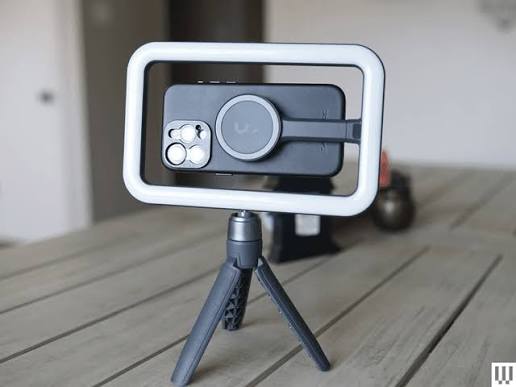
Ring lights are useful for faces, beauty content, talking-head videos, and live streaming, especially when the smartphone is positioned in the center.
Portable LED Light
A portable LED light can be more flexible in many situations because you can position it beside the subject or product and adjust the direction according to the result you want.
RGB Light
RGB lighting is not essential for beginners, but it can be useful when you want to introduce color into a background or create a specific visual mood.
Clip-On Light
A clip-on light offers a compact solution for quick shooting and travel when you do not want to carry larger lighting equipment.
What Should You Look for in a Mobile Photography Light?
Brightness should not be the only consideration.
Look at brightness adjustment, available color temperatures, battery life for portable lights, physical size, and mounting options.
If accurate colors matter for product or skin-tone photography, pay attention to light quality and CRI rather than focusing solely on maximum brightness.
One practical option available on Cart is the MCDODO Selfie Stick Tripod, which combines an extendable stand with a Bluetooth remote and detachable fill light. The light offers six color-temperature settings, while the remote provides shooting control from up to 10 meters according to the product specifications.
Want a lightweight tripod and light in one accessory for quick shooting?
View the MCDODO Selfie Stick Tripod with Fill Light on Cart
5. External Smartphone Lenses: Do They Really Improve Photography?
External smartphone lenses are accessories that should be selected carefully.
Their purpose is not to transform your smartphone into a completely different camera. Instead, they can provide additional optical options that may not be available through your phone's built-in camera system.
Wide-Angle Lens
A wide-angle lens can be useful when you need to fit more of the scene into the frame, including landscapes, certain types of real estate photography, and interior spaces.
Before buying one, however, check whether your smartphone already includes an ultra-wide camera that delivers sufficient quality for your needs.
Macro Lens
Macro lenses can be useful and enjoyable for capturing very small details, including jewelry, product details, flowers, and certain types of food photography.
Telephoto Lens
A telephoto lens can provide a closer view of distant subjects, although the final image quality depends heavily on the quality of the external lens and how accurately it is positioned over the smartphone camera.
Anamorphic Lens
An anamorphic lens is aimed more at users interested in achieving a particular cinematic video aesthetic. It is not an essential accessory for most beginners.
Will Any External Lens Improve Your Smartphone Camera?
No.
A low-quality lens may introduce distortion or reflections and can even reduce image sharpness.
If your smartphone already includes a good wide-angle or telephoto camera, do not assume that adding an external lens will automatically be an upgrade.
6. Smartphone Filters: Useful, but Not Necessarily Your First Purchase
Filters are less common among casual smartphone photographers, but they can be valuable in specific situations.
ND Filter
An ND filter reduces the amount of light reaching the camera. It can be particularly useful for users who want more control over video settings when shooting in bright conditions.
CPL Filter
A CPL filter can help reduce certain reflections, such as reflections from glass and some non-metallic surfaces, depending on the lighting and shooting angle.
Do Beginners Need Smartphone Filters?
Usually, they should not be your first priority.
If your budget is limited, improve stability and lighting first. Consider filters once you begin manually controlling your shooting settings and understand exactly what problem you want the filter to solve.
7. External Microphone: Great Video Still Needs Good Audio
If you only take photos, you can skip this section.
If you use your smartphone for video, however, audio becomes part of the overall production quality.
Built-in smartphone microphones are perfectly adequate for many everyday situations, but their performance can be affected by distance, environmental noise, wind, and echo.
Wireless Lavalier Microphone
A wireless lavalier microphone is useful when the speaker moves around or stands farther away from the smartphone.
Wired Lavalier Microphone
A wired lavalier offers a straightforward solution for interviews and talking-head videos when you remain relatively close to the phone and do not require much freedom of movement.
Shotgun Microphone
A shotgun microphone can be useful when you want to capture sound more directionally from the area in front of the microphone.
If you regularly film multiple people, also check how many transmitters or microphones the system supports.
One option available on Cart is the BOYA BY-VG330, which provides several pieces of equipment in one kit rather than requiring you to purchase everything separately. It includes a BOYA BY-MM1 microphone, LED light, phone clamp, hand grip with tripod base, and carrying case. The product page also lists compatibility with iPhones, Android devices, and other smartphones.
Want to improve audio, lighting, and stability with one smartphone kit?
Explore the BOYA BY-VG330 Smartphone Video Kit on Cart
8. Bluetooth Remote Shutter: Small Accessory, Big Difference for Solo Shooting
A Bluetooth remote is one of those accessories that may not seem essential until you start photographing yourself.
Instead of setting a timer, pressing the shutter button, and quickly moving back into position, you can take the photo remotely.
It is useful for:
Self-portraits, group photos, tripod photography, and certain types of night photography.
Avoiding physical contact with the smartphone when taking the photo can also help prevent unwanted movement in shots that require greater stability.
Before purchasing a separate remote, check what comes with your tripod or selfie stick because many models already include one.
For example, the YESIDO SF17 combines a tripod and selfie stick, provides 360-degree rotation, and includes a Bluetooth remote with a range of up to 10 meters. According to the specifications on Cart, it can extend up to 2,055 mm.
Shoot alone and want to control your smartphone camera from a distance?
Explore the YESIDO SF17 on Cart
9. Power Bank: More Important When a Shooting Session Lasts for Hours
Video recording, especially at higher resolutions, combined with long periods of screen use and high display brightness can drain a smartphone battery quickly.
If your setup also includes a wireless microphone, portable light, or gimbal, you may have several devices that require power throughout the day.
When choosing a power bank for mobile photography, do not look at capacity alone.
Consider:
-
Battery capacity
-
Charging output
-
USB-C support
-
Power Delivery
-
Number of ports
-
Weight
-
Physical size
If your shoots are short and portability matters most, a smaller power bank may be more practical. For long shooting days, carrying a larger capacity may be worthwhile.
10. External Storage: Do Not Wait for the "Storage Full" Message
Video can consume storage quickly, particularly when you record multiple takes, capture plenty of B-roll, or use higher-quality recording settings.
That is why file management should be part of your shooting workflow rather than something you think about after your phone is full.
Your workflow could include:
An external SSD, USB-C flash drive, cloud storage, or regularly transferring footage to a computer.
There is no single storage figure that works for everyone.
Video file size varies depending on resolution, frame rate, codec, and smartphone settings. Check the available storage on your device before a long shooting day rather than relying on a general estimate.
More importantly, if the footage matters, avoid keeping the only copy on your smartphone.
11. Cleaning Kit: Clean the Lens Before Buying Anything Else
This is one of the simplest tips in this guide, but also one of the most practical.
Your smartphone spends all day in your hand, pocket, bag, and on different surfaces. Fingerprints and oils can easily build up on the camera lenses.
The result can be reduced sharpness, lower contrast, or noticeable flare, particularly when bright light sources appear in the frame.
Use a clean microfiber cloth suitable for lenses, and avoid materials or cleaning products that could damage the lens coatings.
Before buying a new lens, clean the one already on your phone.
The difference may be greater than you expect.
Best Mobile Photography Accessories Available on Cart
Choosing the best accessory is not simply about finding the most impressive product. It depends on the type of shot you want to create.
Instead of choosing several products that perform essentially the same job, it makes more sense to build a setup around different shooting needs.
Jmary MT-36 – For Flexible Shooting Heights
If most of your photography is stationary and you need to change the smartphone height depending on the composition, the Jmary MT-36 offers a maximum height of 175 cm and folds down to 50 cm.
It can be useful for group photos, stationary video recording, certain types of product photography, and content where you need to position the phone approximately at eye level.
Best for: Stationary photography and shots requiring flexible height.
MCDODO Selfie Stick Tripod – For Lightweight Shooting With Built-In Lighting
The main advantage here is that the product addresses more than one shooting need. It combines a selfie stick, tripod, detachable fill light, and Bluetooth remote.
According to the product information, it measures 152 mm when folded, extends up to 700 mm, and weighs 140 grams, making it particularly relevant for users who prioritize portability.
Best for: Travel, self-portraits, Reels, and quick everyday shooting.
BOYA BY-VG330 – For Multiple Tools in One Kit
Instead of purchasing a microphone, light, phone clamp, and grip separately, the BOYA BY-VG330 brings these accessories together in a single kit.
That makes it a practical video setup for someone who wants to start shooting interviews, vlogs, or social media videos without building a smartphone rig piece by piece.
Best for: Video recording, interviews, and vlogging.
YESIDO SF17 – For Solo Photography and Travel
The YESIDO SF17 extends up to 2,055 mm and offers 360-degree rotation and a Bluetooth remote with a range of up to 10 meters, according to the specifications listed on Cart.
Its combination of flexible positioning and remote shooting can be particularly useful when you are both the photographer and the person appearing in front of the camera.
Best for: Solo photography, travel, and group photos.
Jmary MT-49 – For Desk-Based Photography
Not everyone needs a tall tripod.
If most of your shooting takes place at a desk, such as small product shots, tutorials, or stationary videos, a desk stand may be more practical than a large floor tripod.
The Jmary MT-49 is available on Cart as an adjustable desk tripod designed to provide stable positioning in a compact format suitable for desk-based setups.
Do most of your shoots happen at a desk?
View the Jmary MT-49 Adjustable Desk Tripod on Cart
BOYA BY-VG350 – A More Complete Mobile Video Setup
For users who want a more complete kit, the BOYA BY-VG350 combines a BOYA BY-MM1 microphone, adjustable LED light, smartphone clamp, tripod with grip, cables for iOS and Android devices, and a carrying case.
That makes it particularly useful for users who want to improve audio, lighting, and stability together rather than upgrading just one part of their setup.
Best for: Vlogging, YouTube, interviews, and smartphone videography.
Want a more complete video setup without purchasing every accessory separately?
Explore the BOYA BY-VG350 on Cart
Comparing the Most Important Mobile Photography Accessories
|
Accessory |
Good for Photos |
Good for Video |
Main Use |
Priority for Beginners |
|
Tripod |
Yes |
Yes |
Stability |
High |
|
LED Light |
Yes |
Yes |
Better lighting |
High |
|
Gimbal |
Limited |
Yes |
Shooting while moving |
Depends on use |
|
Phone Mount |
Yes |
Yes |
Shooting angles |
Depends on use |
|
External Lens |
Yes |
Yes |
Changing field of view |
Medium |
|
Microphone |
No |
Yes |
Better audio |
High for video |
|
Remote Shutter |
Yes |
Yes |
Remote shooting |
Medium |
|
ND/CPL Filters |
Yes |
Yes |
Advanced light control |
Advanced |
Best Mobile Photography Setup for Different Uses
Instead of building one setup and trying to use it for everything, choose your equipment according to the type of content you actually shoot.
For Reels and TikTok
Start with:
Tripod + LED Light + Microphone
If your videos rely heavily on camera movement, consider adding a gimbal later.
For Product Photography
Your priority should be controlling the frame and lighting:
Tripod + Adjustable LED Light + Phone Mount
If you regularly photograph very small products, a good macro lens may also be useful if your smartphone camera cannot achieve the result you need.
For Vlogging
Movement, audio, and battery life become more important:
Gimbal + Wireless Microphone + Power Bank
Try to keep the setup lightweight, especially if you will carry it for several hours.
For Food Photography
You will often benefit most from:
Overhead Mount + Adjustable Light
A strong overhead composition and controlled lighting can have a greater impact than investing in advanced stabilization equipment.
For Travel Photography and Video
Prioritize portability:
Compact Tripod + Gimbal + Power Bank + Portable Light
Do not build a setup that looks excellent on paper but is so inconvenient that you never want to carry it.
For Night Photography
Start with:
Tripod + Remote Shutter
Stability becomes particularly important in low-light situations, especially when your smartphone uses longer exposure times or Night Mode.
Which Accessory Should You Buy First?
You do not need a huge budget. What matters is spending it on the right problem.
Are your photos blurry because of movement?
Start with a tripod.
Does your video look shaky while walking?
Consider a gimbal.
Are your images dark or are products poorly lit?
Invest in lighting.
Does your audio sound distracting or unclear?
Buy a microphone before another visual accessory.
Can you not achieve the shooting angle you want?
Look for the right phone mount.
Does your smartphone battery struggle to last through shooting days?
Consider a power bank.
This approach ensures that every accessory you purchase has a clear purpose.
Common Mistakes When Buying Mobile Photography Accessories
One of the biggest mistakes is buying equipment simply because you saw it in someone else's setup.
A gimbal may be essential for a travel vlogger but almost unnecessary for someone who only photographs stationary products on a table.
Another common mistake is ignoring compatibility. Check your smartphone's dimensions and weight, connector type, and the accessory's mounting system before ordering.
With external lenses, never assume that adding another lens automatically improves the image. The quality of the glass and its alignment with the smartphone camera can directly affect the final result.
Other common mistakes include choosing a light based solely on brightness, buying a tall but unstable tripod, or creating a setup that is too large and heavy for outdoor shooting.
And perhaps the most important mistake:
Relying on equipment instead of learning photography fundamentals.
How Can You Improve Mobile Photography Without Buying Accessories?
Before purchasing new equipment, there are several free improvements worth trying.
Start by cleaning the camera lens. Use the main camera when it is the best option rather than relying unnecessarily on digital zoom. Turn on the camera grid to improve composition, and pay attention to the direction of the light and the background before pressing the shutter or record button.
For shots that require stability, place your smartphone against a safe, stable surface if you do not have a tripod yet.
Learn how to control focus and exposure using your smartphone's camera app, and select resolution and frame rate according to your actual needs instead of automatically choosing the highest settings every time.
Accessories give you more control, but they cannot compensate for weak photography fundamentals.
Checklist Before Buying Mobile Photography Equipment
Before ordering an accessory, ask yourself:
-
Do I mainly shoot photos or videos?
-
Do I shoot from a stationary position or while moving?
-
Do I mostly shoot indoors or outdoors?
-
What specific problem am I trying to solve?
-
Is the accessory compatible with my smartphone?
-
Does it require USB-C or Lightning?
-
Can it support the size and weight of my phone?
-
Will I use it while traveling?
-
Does it require charging or batteries?
-
Do I already own something that performs the same function?
-
Will I use it regularly?
If you cannot clearly identify the problem an accessory will solve, it probably should not be your first purchase.
FAQs About Mobile Photography Accessories
What Are the Most Important Mobile Photography Accessories for Beginners?
A tripod and good lighting are strong starting points for both photography and video. If you record videos with speech, add a suitable microphone. From there, you can expand your setup according to the type of shooting you do.
What Is the Best Smartphone Mount for Video?
It depends on how you shoot. A tripod works well for stationary videos, while a gimbal is better when you move with the camera. An overhead mount is more practical when shooting directly from above.
What Is the Difference Between a Tripod and a Gimbal?
A tripod keeps your smartphone stationary in a fixed position. A gimbal is designed to reduce unwanted movement while the smartphone itself is moving.
Is a Gimbal Necessary for Reels?
No. If your Reel is filmed from a stationary frame, a tripod is usually enough. A gimbal becomes useful when camera movement is an important part of the video.
Are External Smartphone Lenses Worth Buying?
They can be useful when you need a type of shot your smartphone's built-in cameras cannot provide, such as a particular macro view or optical effect. However, lens quality matters, and attaching an external lens does not automatically improve image quality.
What Is the Best Lighting for Mobile Photography?
It depends on the application. Ring lights are practical for faces, while separate LED lights generally provide more flexibility in positioning and light direction. Portable or clip-on lights may be more convenient when shooting on the go.
What Equipment Do You Need for Product Photography With a Smartphone?
Start with a stable tripod, controllable lighting, and a mount suitable for the angle you need. If you want to shoot products from directly above, add an overhead mount.
Do You Need an External Microphone for Smartphone Video?
Not always. An external microphone becomes more useful when the speaker is far from the smartphone, when you are filming in a noisy environment, or when clearer dialogue is important.
How Can You Improve Night Photography on a Smartphone?
Keep the smartphone as stable as possible, use Night Mode when appropriate, and avoid unnecessary digital zoom. A tripod and remote shutter can help reduce camera movement.
Can You Take Professional-Quality Photos and Videos Using Only a Smartphone?
Modern smartphones can produce very high-quality photos and videos when lighting, composition, stability, and camera settings are handled properly. Accessories can provide greater control over these factors, but they are not a substitute for understanding photography fundamentals.
Conclusion: Choose Accessories Based on the Shot, Not the Amount of Gear
Ultimately, the best mobile photography accessories are not the same for everyone.
If you photograph products, a tripod and good lighting may be your most valuable investments. If you shoot while traveling, your priorities may shift toward a gimbal, power bank, and lightweight equipment. If you often photograph yourself, a Bluetooth remote and flexible tripod may become some of the tools you use most frequently.
Always start with the problem affecting your photo or video:
Stability → Tripod
Movement → Gimbal
Lighting → LED Light
Audio → Microphone
Angles → Phone Mount or Lens
Then expand your equipment as your photography skills and needs develop.
Ready to upgrade your mobile photography setup?
Explore Cart and choose mobile photography accessories that genuinely help you create the shots you want, rather than adding equipment you may never use.